Action required: Salesforce MFA enforcement and Skedulo Plus
8 July 2026

Summary
Skedulo has released a new setting for Skedulo on Salesforce customers using the Skedulo Plus mobile app to access Salesforce user interfaces (e.g. Visualforce pages). There is no impact to Skedulo Pulse platform customers.
Salesforce is enforcing Multi-Factor Authentication (MFA) for all employee users and is removing the Waive Multi-Factor Authentication for Exempt Users permission that previously exempted users from this requirement. Details are in Salesforce's own release documentation:
- Prepare for MFA Enforcement for All Employee Users
- Salesforce Multi-Factor Authentication FAQ
- Exclude Exempt Users from MFA (and how to request exemptions)
Skedulo Plus can embed authenticated Salesforce UI inside the mobile app, most commonly a Visualforce page (e.g. forms such as the Timesheets), but could include other Salesforce web UI, for example Lightning pages. Loading any of these establishes what we refer to below as a Salesforce UI session.
This session is exactly what Salesforce's MFA enforcement now affects. Salesforce treats it as direct UI access and can interrupt it with an MFA challenge or enrolment screen that field workers cannot complete inside the app.
Skedulo has delivered a platform update that restores access. This release note explains the impact, the dates that matter, and what you need to do if impacted.
Potential impact
If you use Skedulo on Salesforce and your field workers open any authenticated Salesforce UI inside Skedulo Plus (e.g. a Visualforce page, a Lightning page, or embedded Salesforce-hosted content) you will be impacted by this change. Visualforce-based forms are the most common examples, but the impact is not limited to them.
Aside from Salesforce-native MFA, customers who federate Salesforce logins through a third-party identity provider such as Azure AD, where no Salesforce-side configuration alone resolves the interruption, are also impacted.
When the Waive MFA exemption stops applying, affected users opening a Salesforce UI session in Skedulo Plus may be presented with a "Choose a Verification Method" enrolment screen or an MFA challenge by Salesforce. Because this challenge renders inside the app's embedded browser, users cannot complete it and cannot open the page.
Other Skedulo Plus features (e.g. jobs, offers, mobile extensions) are unaffected. They are native mobile components that integrate with Salesforce via API, not through a browser session.
Key dates
| Environment | Enforcement begins | Notes |
|---|---|---|
| Sandboxes | 06 July 2026 (was previously 22 June 2026) | Active since 06 July 2026; you can reproduce and validate the impact now. |
| Production | 20 July 2026 | Rolled out on a staggered basis over approximately 2 months. Impact will not hit every org at the same time. |
Because sandbox enforcement is already live, test in a sandbox now rather than waiting for the production date.
Recommended action for impacted customers
If your field workers open any Salesforce UI (Visualforce or Lightning pages) inside Skedulo Plus, enable and test the new Salesforce MFA delegation setting as soon as possible.
1. Reproduce and validate in your sandbox now Sandbox MFA enforcement became active in sandboxes on 06 July 2026. In your sandbox, remove the Waive MFA permission from a test worker (to mirror the post-enforcement state) and open a Salesforce UI page in Skedulo Plus to confirm whether your org is affected.
2. Configure a new SSO Setting in Salesforce as per these instructions https://docs.skedulo.com/user-guides/admin-and-config/admin-and-config-salesforce/enable-salesforce-mfa-delegation/#part-1--configure-skedulo-sso-in-the-salesforce-org
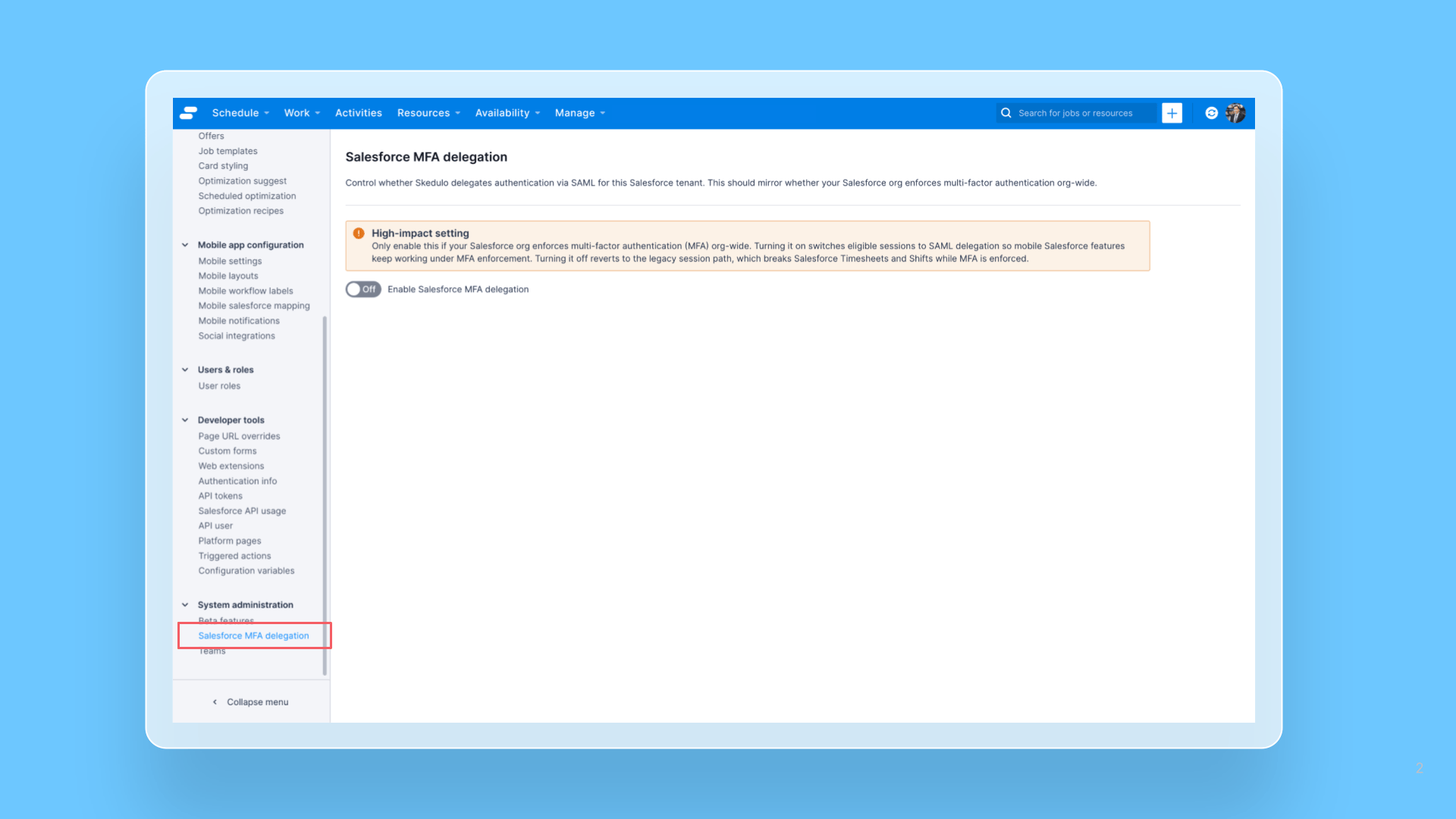
3. Enable the new Salesforce MFA delegation setting in Skedulo Skedulo now provides a tenant-controlled option:
Settings → System administration → Salesforce MFA delegation
Enabling it switches Salesforce UI sessions to a High Assurance Salesforce session (see the 'What does the Salesforce MFA setting do?' section below). The setting is visible only to administrators of Salesforce-backed Skedulo tenants.
4. Confirm your login enforces MFA before enabling Enabling the toggle requires confirming an attestation that your Skedulo Plus sign-in already enforces MFA at your identity provider (e.g. Azure AD / Auth0). This is what allows Skedulo to honestly assert a High Assurance session to Salesforce. Do not enable it if your app login does not enforce MFA.
5. Validate the end-to-end flow in the sandbox, then coordinate production activation After enabling in a sandbox, confirm a test worker can open the affected Salesforce UI without interruption. Contact Skedulo Support to confirm impact and coordinate turning the capability on for your production org ahead of 20 July 2026.
Mobile app users should not need to re-authenticate, as Salesforce UI sessions are created when needed.
Still need the exemption? Salesforce allows the MFA exemption to be restored for approved use cases by contacting Salesforce Support. This can be pursued in parallel as a fallback, but it is not a long term substitute for enabling the Skedulo fix.
What does the Salesforce MFA setting do?
Previously, Skedulo built the embedded Salesforce UI session from a server-to-server token that carried no MFA signal, so Salesforce classified it as a Standard Assurance session, exactly the sessions MFA enforcement now interrupts.
Skedulo has changed how the Salesforce UI session is established. The platform now delegates the session using a signed SAML assertion that propagates the user's genuine MFA signal from their sign-in. Salesforce accepts this as a High Assurance session, so the page loads without an MFA interruption, while keeping the MFA guarantee intact rather than bypassing it.
This capability is gated behind the tenant-admin Salesforce MFA delegation setting described above, so each customer controls when it is enabled for their org. The self-attestation confirmation at enable time ensures the High Assurance claim is honest for your environment.
Further assistance required?
Questions or need help validating your configuration? Contact Skedulo Support by logging a support ticket at https://support.skedulo.com/