

// Skedulo for Salesforce
Schedule and dispatch frontline work from Salesforce.
Install the Skedulo managed package in your Salesforce org to schedule and dispatch frontline work. Workers use Skedulo Mobile, our mobile app, to view assignments and record updates against the job.
//How it works
Skedulo jobs in your Salesforce org.
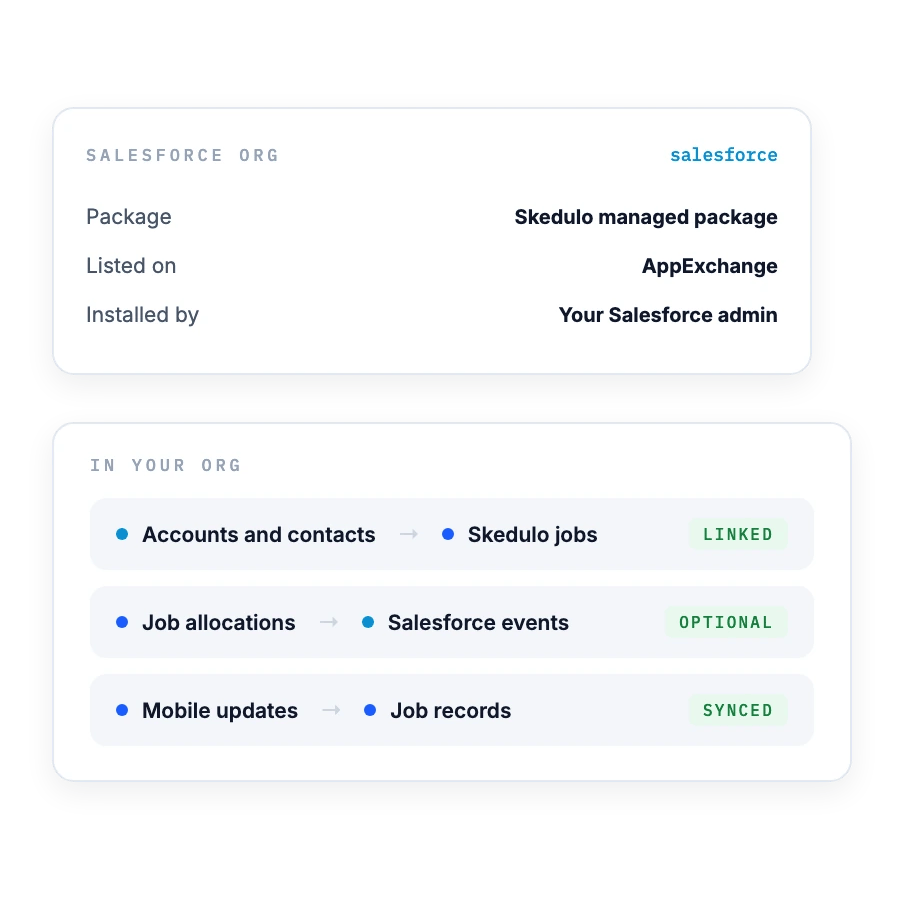
The managed package adds Skedulo objects to your org and works with your existing customer records and custom objects. Schedulers also work in the Skedulo web app, and workers use Skedulo Mobile.
In your Salesforce org
Link jobs to accounts, contacts and locations, and map your own custom objects to Skedulo. Your Salesforce org remains the source of truth for customer records.
How schedulers and frontline teams use those records
Schedulers plan and dispatch jobs in Salesforce and the Skedulo web app. Workers see their assignments in Skedulo Mobile, and their updates are recorded against the job in your org. We confirm the objects, fields and permissions during setup.
//Requirements
What you need before you start.
Check these with your Salesforce admin before you plan the rollout.
Salesforce
- Editions listed on AppExchange: Enterprise, Unlimited, Force.com and Developer
- A Salesforce admin to install the managed package
Skedulo licenses
- A Skedulo license for each scheduler, worker and other user who needs access to Skedulo data
- Each Skedulo license includes a Salesforce platform license, which doesn't provide access to Opportunities
- Optimization is a premium feature, licensed separately
//Setup
Deployment and rollout.
Skedulo for Salesforce is a managed package on AppExchange. Our team sets up your Skedulo environment with you.
How it deploys
- The Skedulo managed package, installed in your Salesforce org
- Users sign in to the Skedulo web app with their Salesforce credentials or single sign-on (SSO)
- Skedulo pushes most package upgrades and tells you first; some releases need a manual install
Setup steps
- Confirm licenses and scope
- Install the managed package in your Salesforce org
- Configure records and permissions
- Test scheduling, dispatch and mobile updates before rollout

How AWP used Skedulo with Salesforce.

“For our folks in the field, instead of being nose down in a ticket, they are hitting a button to say, 'I'm here, I've started work or I've ended work,' which is extremely exciting for them.”
About this result
- In its published case study, Area Wide Protective (AWP) reported 86% more efficient scheduling and dispatching.

Let's talk about frontline work in Salesforce.
See scheduling, dispatch and Skedulo Mobile in the context of your Salesforce records and service process.