



What’s new
- Filters and headers stay visible while scrolling: On the Scheduling Console (old and new), the Resource Roster Console and the Allied Health Calendar Console, the filter panel and header now stay at the top while you scroll. You can change a filter or view on long lists, including lists of 100+ resources, without scrolling back up and losing your place.
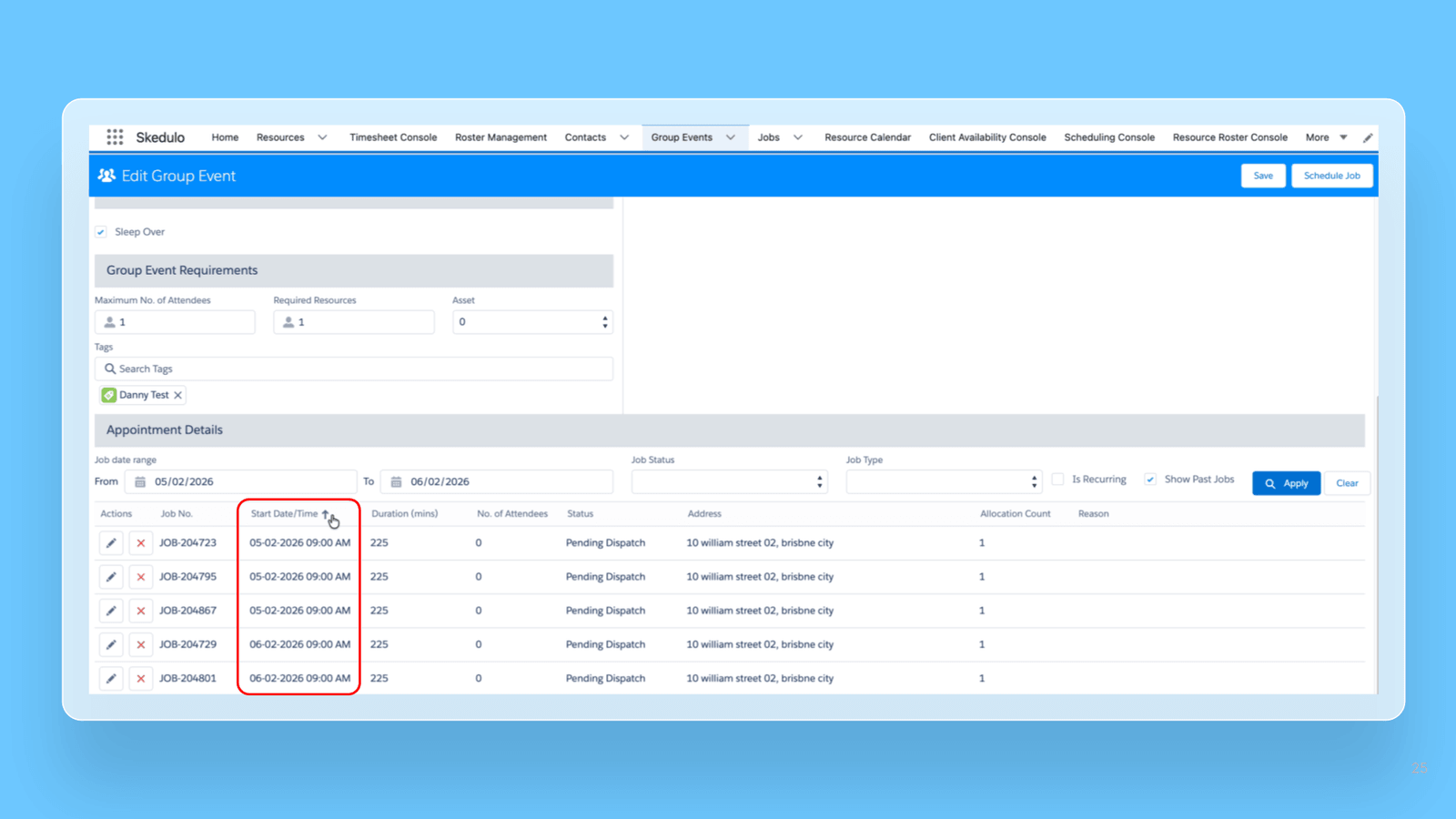
- Sort and filter jobs by date in Group Events: You can now sort a Group Event’s jobs list by start date, duration or allocation count, filter it by date range, and hide past jobs. This means schedulers, coordinators and admin or finance staff can find current work quickly, even on long-running programs with thousands of jobs.
- Additional fields for Travel & Transport in the Allied Health Console: Admins can now add Job Allocation fields to the Travel & Transport pop-up, using the new TravelTransport category in HC_Additional_Fields. Schedulers fill in these fields when they record travel and transport, so the information stays on the booking it belongs to. No fields are set up by default.
Bug fixes
Roster replication emails list replicated records again. After the Salesforce Winter ‘27 release, replication result emails showed empty tables marked as truncated, even for small runs. They now list every replicated Job, Shift and Activity again, and the truncation message only appears when a run is actually too large. The replicated data and totals were always correct. This fix applies to both scheduled and manual runs, and no setup is needed.